There are two ways to delete your account. Use the app if you still have it; otherwise, email us.
Option 1 · Fastest
In the app
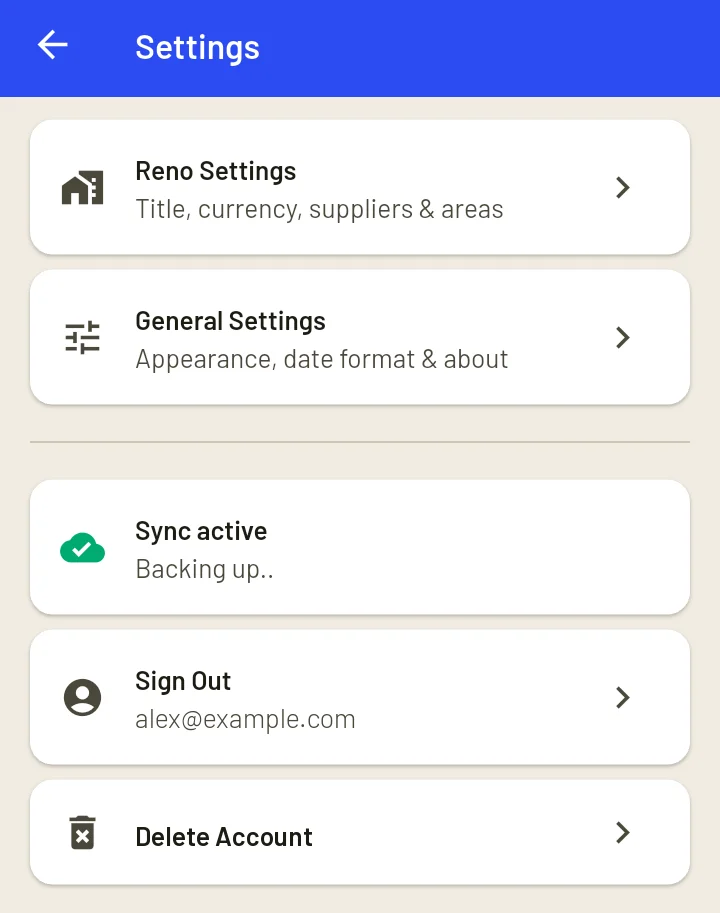
- Open Reno Tracker and go to Settings → Delete Account.
- If you want a copy, tap Export purchases first.
- Tap Delete account and confirm. You may be asked to sign in again to confirm it's you.
Your account and data are deleted straight away.
Option 2 · No app needed
By email
Email success@reno-tracker.com with the subject "Delete my account", and tell us the email address you sign in with.
To protect your account, we'll email that address and ask you to confirm before anything is deleted. We will never ask for your password.
Once you confirm, we'll delete your account and data within 30 days and let you know when it's done.
What is deleted
- Your account (Google or email sign-in)
- Projects and plans, your To Buy list and purchases
- Receipts, including emailed receipts waiting for review
- Your suppliers and areas
- Your profile, notification settings and any feedback you sent
Project photos are stored only on your phone, never on our servers. They are removed when you delete your account in the app, or when you uninstall it.
What is kept
Crash reports are kept for up to 90 days to help fix bugs. They don't contain your projects or purchases. Nothing else is kept, and deletion can't be undone.
Subscriptions
If you pay for Reno Tracker Pro through Google Play, deleting your account doesn't cancel the subscription. Cancel it first in the Google Play Store under Payments & subscriptions → Subscriptions.
See our Privacy Policy for more on how your data is handled.